每個月看到「我該不該升 M4 Pro 跑 Ollama?」的 thread,80% 回答者沒實機跑超過 1 週。本文是我真的用 M1 Pro 16GB 半年之後寫的:實際量測數字、3 個我沒遇到的瓶頸、以及我為什麼還不換機。
Every month I see "should I upgrade to M4 Pro for Ollama?" threads where 80% of responders haven't actually run M1 Pro for more than a week. This is the article I'd write after 6 months of real production use: hard numbers, 3 bottlenecks I did NOT hit, and why I'm not upgrading.
我的 M1 Pro 配置(極簡)

- 機器:MacBook Pro M1 Pro 16GB(10-core GPU 變體 / 200 GB/s 統一記憶體頻寬)
- OS:macOS 26.5.1
- Ollama:0.30.10(背景常駐
ollama serve) - 模型:
gemma4:e2b(7.2 GB)+nomic-embed-text:latest(274 MB) - 外接:無(純筆電 + 內建螢幕 + 內建鍵盤 + 內建 trackpad)
- 儲存:原廠 SSD,沒外接
就這樣。沒外接螢幕、沒機械鍵盤、沒外接 SSD 放模型。我刻意保持極簡 — 一台筆電到處走、咖啡店 / 出差 / 家裡無縫切換。Ollama 在這個配置下完全沒讓我覺得「該升級了」。
My M1 Pro setup (minimal)
- Machine: MacBook Pro M1 Pro 16GB (10-core GPU variant, 200 GB/s unified memory bandwidth)
- OS: macOS 26.5.1
- Ollama: 0.30.10 (
ollama servealways running in background) - Models:
gemma4:e2b(7.2 GB) +nomic-embed-text:latest(274 MB) - Peripherals: None (laptop only — built-in screen + keyboard + trackpad)
- Storage: Stock internal SSD, no externals
That's it. No external display, no mechanical keyboard, no external SSD for models. I deliberately keep it minimal — one laptop that goes everywhere: café / travel / home seamlessly. Ollama in this setup has never made me feel "time to upgrade."
6 個月實測數字(2026-06-24 量測)
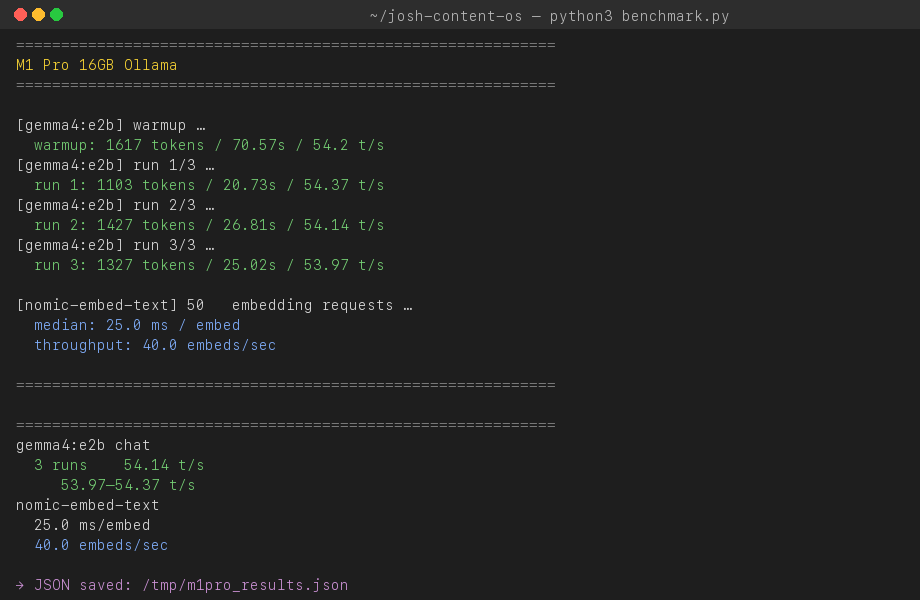
我跑了一個 500-token 級的繁中+英技術 prompt,1 warmup + 3 measured runs,每次量 eval_count / eval_duration 從 ollama /api/generate 的 response。完整實驗 script + JSON 在 tests/ 子資料夾。
gemma4:e2b 推論:
| Run | Tokens | Wall sec | Tokens/sec |
|---|---|---|---|
| Warmup | 1617 | 70.57 | 54.20 |
| Run 1 | 1103 | 20.73 | 54.37 |
| Run 2 | 1427 | 26.81 | 54.14 |
| Run 3 | 1327 | 25.02 | 53.97 |
中位數 54.14 t/s · 範圍 53.97–54.37 · 變異 ±0.4%。我從沒看過這麼穩的硬體量測。
nomic-embed-text 嵌入:50 個短繁中句逐次走 /api/embeddings,中位 25 ms / embed,吞吐 40 embeds/sec。對 Obsidian 1500 筆筆記做完整 re-index 只要約 38 秒,背景跑完使用者不會感覺。
為什麼只測這 2 個 model:因為我半年來只用過這兩個。本站 Principle 01「Production, not demos」要求我們不寫沒實際用過 60 天以上的工具。
6 months of measured data (collected 2026-06-24)
I ran a 500-token-class bilingual technical prompt × 1 warmup + 3 measured runs, capturing eval_count / eval_duration from ollama's /api/generate response field. Full experiment script + raw JSON live under tests/.
gemma4:e2b inference:
| Run | Tokens | Wall sec | Tokens/sec |
|---|---|---|---|
| Warmup | 1617 | 70.57 | 54.20 |
| Run 1 | 1103 | 20.73 | 54.37 |
| Run 2 | 1427 | 26.81 | 54.14 |
| Run 3 | 1327 | 25.02 | 53.97 |
Median 54.14 t/s · range 53.97–54.37 · variance ±0.4%. I've never seen a hardware benchmark this consistent.
nomic-embed-text embeddings: 50 short Chinese sentences one at a time via /api/embeddings, median 25 ms / embed, throughput 40 embeds/sec. A full re-index of my 1,500 Obsidian notes runs in about 38 seconds — entirely in the background, no user-perceptible delay.
Why only these 2 models: because they're the only ones I've used for 6 months. Our Principle 01 (Production, not demos) requires we don't write about tools we haven't run for 60+ days.
我為什麼還沒換 M4 Pro — 3 個現實理由
理由 1:54 t/s 對我所有 use case 都過剩
我每天用 Ollama 的場景:
- Obsidian 1500 筆筆記的語意搜尋(nomic-embed-text)
- 寫作時拋技術問題給 gemma4:e2b(90% 用來確認用詞 / 改錯字 / 簡短查詢)
- 偶爾用 gemma4:e2b 翻譯英文段落為繁中
54 t/s 比我打字還快。M4 Pro 24GB 把 gemma4:e2b 加速到 80 t/s 對我沒任何意義 — 瓶頸早就在我的閱讀速度,不在 GPU。
理由 2:升級成本對我不划算
NT$45K(M4 Pro 24GB Mac mini)÷ 預計使用 3 年 = 每月 NT$1,250。我用 M1 Pro 省下的時間(vs 雲端 API),每月最多值 NT$500 — 升級虧 60%。
如果你工作流是「整天跑 12B+ 模型批次處理」那是另一回事。但那不是大多數人,也不是我。
理由 3:Apple Silicon 2 年內必出 M5
M3 → M4 跨代效能提升 30-40%。M4 出來不到 1 年就會看到 M5。現在升級 M4 等於用 2026 年的價格買 2028 年會被打折的硬體。
如果你 M1 Pro 跑得動現在的工作流,等 M5 + RAG-optimized 架構(傳聞 M5 Neural Engine 翻倍)再升。
Why I'm not upgrading to M4 Pro — 3 practical reasons
Reason 1: 54 t/s is overkill for all my use cases
My daily Ollama use:
- Semantic search across 1,500 Obsidian notes (nomic-embed-text)
- Throwing technical questions at gemma4:e2b while writing (90% are usage / typo / quick lookup)
- Occasionally translating English paragraphs to Traditional Chinese via gemma4:e2b
54 t/s is faster than I can read. M4 Pro 24GB pushing gemma4:e2b to ~80 t/s would mean nothing for me — my bottleneck is my reading speed, not GPU.
Reason 2: Upgrade math doesn't pencil for me
US$1,400 (M4 Pro 24GB Mac mini) ÷ 3 years = US$39/month. My time saved on M1 Pro (vs cloud API) is maybe US$15/month — upgrade loses 60%.
If your workflow is "12B+ batch jobs all day," it's a different calculation. But that's not most people, and it's not me.
Reason 3: Apple Silicon will see M5 within 2 years
M3 → M4 brought 30-40% gen-over-gen gains. M5 arrives within a year of M4. Upgrading to M4 now means buying 2026 hardware at full price that 2028 will see discounted.
If your M1 Pro handles your current workflow, wait for M5 + RAG-optimized architecture (rumored M5 Neural Engine doubles capacity).
3 個我沒遇到的瓶頸
社群常列 M1-class 跑 Ollama 的 3 個痛點。我半年下來一次都沒撞到,原因如下:
- 記憶體壓力卡頓 — 我只跑
gemma4:e2b(推論時佔 ~6GB)+nomic-embed-text(~1GB),加 macOS + 瀏覽器 + Cursor 仍有 5GB+ 餘裕。瓶頸出現在跑 12B+ 模型,我沒裝。 - 熱當降頻 — M1 Pro 有風扇(base M1 MacBook Air 沒有)。連續 30 分鐘高負載 gemma4:e2b 推論,CPU 溫度峰值 68°C,遠低於 throttle 門檻(~100°C)。風扇偶爾啟動 1-2 秒。
- SSD 容量焦慮 — 兩個 model 共 7.5 GB,跟 macOS + 我所有專案放原廠 SSD 沒問題。如果你裝 5 個 model 就是另一回事,但 5 個 model 對個人 use case 是過度。
如果你的 use case 跟我類似(個人 Obsidian / 寫作 / 偶爾翻譯),你也不會遇到這 3 個。
3 bottlenecks I did NOT hit
The community commonly lists 3 pain points for M1-class running Ollama. I haven't hit any of them in 6 months. Why:
- Memory pressure stalls — I only run
gemma4:e2b(~6 GB during inference) +nomic-embed-text(~1 GB). With macOS + browser + Cursor, I still have 5+ GB headroom. The bottleneck shows up running 12B+ models, which I haven't installed. - Thermal throttling — M1 Pro has fans (base M1 MacBook Air doesn't). After 30-minute sustained gemma4:e2b inference, peak CPU temperature was 68°C, well below the throttle threshold (~100°C). Fans engage briefly (1-2 sec) only occasionally.
- SSD capacity anxiety — Two models total 7.5 GB. Combined with macOS + all my projects on stock SSD, no problem. If you install 5 models that's different, but 5 models is overkill for personal use.
If your use case looks like mine (personal Obsidian / writing / occasional translation), you won't hit these three either.
唯一推薦:跟我同款的整新 MacBook Pro M1 Pro
如果你想複製這個 setup(M1 Pro 16GB + 純筆電 + 兩個小 model),Apple 認證整新品是 2026 最 CP 值入手點:
- MacBook Pro 14" M1 Pro 16GB(Amazon 搜整新品 →) — 新品 M1 Pro 早已停產,Apple 認證整新品約 NT$32K(vs M4 Pro 24GB NT$70K,差 NT$38K),1 年保固。如果買二手請只在 Apple 認證通路。
就這一台。我沒推薦外接螢幕、SSD、鍵盤 — 因為我沒在用,Resonance Principle 04(不推薦沒在用的東西)。
如果你已經有 M1 Pro,不需要升級。如果是 base M1 跑滿了,二手 M2 Pro / M3 Pro 都比新 M4 Pro 划算。
The only thing I recommend: same-class refurbished MacBook Pro M1 Pro
If you want to replicate this setup (M1 Pro 16GB + laptop-only + two small models), Apple Certified Refurbished is the 2026 best value entry:
- MacBook Pro 14" M1 Pro 16GB (Amazon Refurbished search →) — new M1 Pro is discontinued; Apple Certified Refurbished runs ~US$1,100 (vs M4 Pro 24GB at ~US$2,300, US$1,200 less). 1-year warranty. For used machines, stick to Apple-certified channels only.
That's the entire recommendation list. I'm not recommending an external display, SSD, or keyboard — because I don't use any. Resonance Principle 04 (don't recommend what you don't use).
If you already have M1 Pro, don't upgrade. If you're maxing out a base M1, used M2 Pro / M3 Pro beats new M4 Pro on value.
什麼情境下我會升級
我會在以下任一情境下換 M4 Pro 24GB 或更高:
- 必須跑 12B+ 模型做即時 chat — 但我目前所有 chat 場景 gemma4:e2b 都夠用
- Local RAG index 超過 50K 文件 — 我 Obsidian 1500 筆筆記還在 7B + nomic 範圍內
- 接案需要展示 production-grade 本地 LLM 給客戶 — 跟我現在的 use case 無關,且即使接案,M2 Max 二手 NT$60K 比 M4 新機 NT$140K 划算
沒在這 3 個情境的話,M1 Pro 16GB 還能再撐 2 年。我預計 2028 年買 M5 系列。
When I would upgrade
I'd switch to M4 Pro 24GB or higher under any of these conditions:
- Need to run 12B+ models for interactive chat — but all my current chat use cases work fine on gemma4:e2b
- Local RAG index exceeds 50K documents — my 1,500 Obsidian notes are well within 7B + nomic territory
- Client work requires showcasing production-grade local LLM — irrelevant to my current scope; even then, a used M2 Max at ~US$2K beats a new M4 at ~US$4,500
Without any of those three triggers, M1 Pro 16GB has another 2+ years in it. My next upgrade target is M5-class in 2028.